How to Present Calorie and Nutrition Info on Your Restaurant Menu Legally and Clearly
Updated:
Why Nutrition Labeling Matters Now
Diners are more nutrition-aware than ever. A growing share of guests check calorie counts before ordering—not just those on strict diets, but everyday customers who want to make informed choices. At the same time, federal law now requires many restaurant operators to post calorie information on menus. Getting this right isn't just about compliance; it's about building trust with your guests and reducing friction at the point of order.
This guide covers exactly what the law requires, how to calculate and verify your numbers, and how to present nutrition information in a way that's clear, honest, and easy to maintain—especially if you're managing a digital menu that you update regularly.
Understanding the FDA Menu Labeling Rule
The FDA's menu labeling rule went into full effect in May 2018. It applies to chain restaurants and similar retail food establishments with 20 or more locations doing business under the same name and offering substantially the same menu items. If you run a single independent restaurant, you are not legally required to comply—but you may still choose to, and many guests will appreciate it.
Who must comply
- Chain restaurants with 20 or more U.S. locations
- Bakeries, coffee shops, ice cream shops, and similar establishments that meet the 20-location threshold
- Carry-out and delivery menus for covered establishments
- Vending machine operators with 20 or more machines
Who is exempt (but may still benefit)
- Independent restaurants with fewer than 20 locations
- Temporary food establishments and food trucks (generally exempt)
- Alcohol beverages (exempt from calorie labeling under the rule)
- Daily specials and limited-time offers (exempt, though disclosure is good practice)
Even if you're exempt, voluntarily displaying calorie information signals transparency and can differentiate you from competitors. Many independent operators are now adding nutrition data to their restaurant menus simply because guests ask for it.
What the Law Actually Requires You to Display
If you are a covered establishment, here is the minimum the FDA rule demands:
Calories on the menu itself
Calorie counts must appear clearly and conspicuously on the menu or menu board, adjacent to the name of each standard menu item. The calorie declaration must be in the same size and prominence as the item name or price—it cannot be buried in fine print or hidden in a footnote.
The 2,000-calorie statement
Menus must include a succinct statement about daily caloric intake for context. The FDA-approved language is: "2,000 calories a day is used for general nutrition advice, but calorie needs vary." This must appear on each page of a multi-page menu and on every menu board where calories are listed.
Additional nutrition information on request
Covered establishments must have additional nutrition data—total calories, total fat, saturated fat, trans fat, cholesterol, sodium, total carbohydrates, fiber, sugars, and protein—available in written form upon customer request. This does not need to be printed on every menu, but it must be accessible. A laminated reference sheet, a binder at the host stand, or a link to a dedicated page on your website all satisfy this requirement.
Accuracy standards
Calorie counts must be based on reasonable basis—either laboratory analysis, nutrient databases, or cookbooks and other recognized references. You don't need to send every dish to a lab, but your numbers need to be defensible. Significant rounding is acceptable (round to the nearest 10 calories for items over 50 calories), but inflating or understating figures to make dishes look healthier than they are is a compliance risk.
How to Calculate Your Calorie Counts
Getting accurate numbers is the hardest part for most independent operators. Here are your main options, ranked by cost and precision:
1. Use a nutrition analysis software or database
Tools like Cronometer, MenuCalc, or the USDA FoodData Central database let you enter ingredients and portion sizes to generate calorie and nutrient totals. This is the most practical route for most restaurants. It requires accurate recipes with standardized portion weights—if your kitchen measures by eye, you'll need to standardize first.
2. Work with a registered dietitian
A dietitian can review your recipes, check your calculations, and flag any items that are likely to vary significantly. This is especially useful if you have complex dishes, house-made sauces, or items with many customization options. Expect to pay $500–$2,000 for a full menu analysis, depending on size and complexity.
3. Laboratory testing
Sending samples to a food testing lab gives you the most precise numbers, but it's expensive ($300–$800 per item) and impractical for large menus. Reserve this for signature dishes or items you market specifically on health grounds.
4. Use manufacturer data for packaged ingredients
If you use packaged, pre-portioned ingredients (commercial sauces, packaged proteins, pre-made doughs), the nutrition facts on the label are a reliable starting point. Scale up or down based on your actual portion size.
Key principle: Document your methodology. If you're ever audited or questioned, you need to show how you arrived at your numbers. Keep a recipe log with weights, sources, and calculation dates.
Handling Menu Items with Variability
Real menus are messy. Guests customize orders. Portions vary slightly between cooks. Here's how to handle the most common complications:
Customizable items
For items like build-your-own bowls, burgers with toppings, or pasta with sauce options, the FDA allows you to present a calorie range (e.g., "480–920 Cal") or to list the base item's calories and note that additions will increase the count. Pick the approach that's most honest for your specific item.
Combo meals
List the calorie total for the combo as served. If the combo includes a choice (e.g., fries or salad), show the range or list calories for each option separately.
Daily specials and limited-time items
These are generally exempt from mandatory labeling. However, if you're running a digital menu, it's easy to add a calorie estimate even for specials—and guests will notice the consistency.
Seasonal menu changes
Every time you change a recipe or introduce a new item, update your calorie data. This is one strong argument for using a digital menu over printed menus: you can update a number in seconds without reprinting anything. With a tool like MenuHoster's online menu maker, edits go live instantly across all your QR codes and links.
How to Present Nutrition Info Clearly Without Cluttering Your Menu
Compliance is the floor, not the ceiling. The real goal is to present nutrition data in a way that helps guests make decisions without making your menu feel like a hospital cafeteria brochure. Here's how to strike that balance:
Use consistent formatting
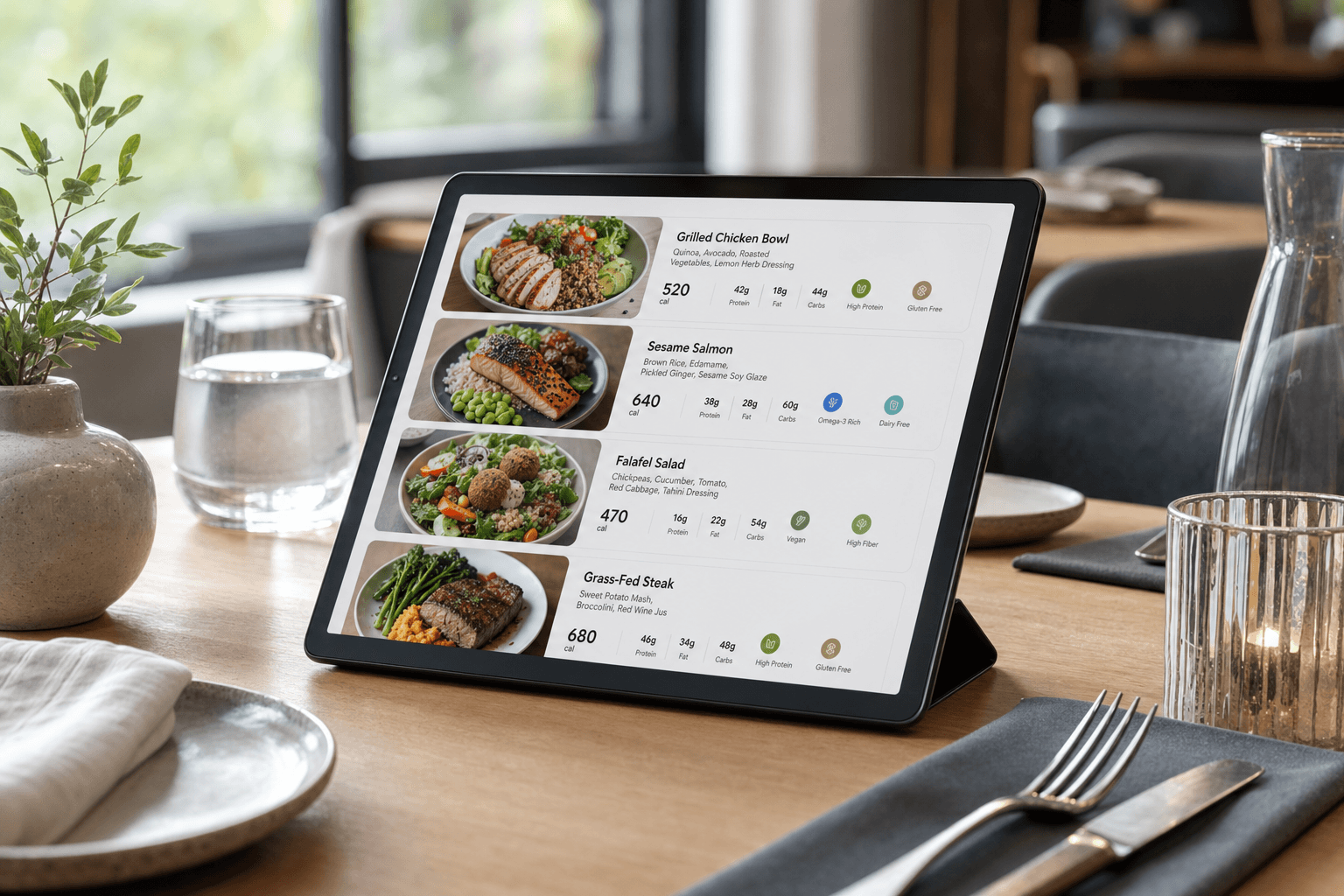
Place calorie counts in a consistent location relative to each item—typically after the price or in a small secondary line below the item name. Use a slightly smaller font size than the item name but never so small it becomes invisible. A format like "580 Cal" or "580 kcal" is clean and universally understood.
Don't lead with nutrition
Your menu's primary job is to sell food. Keep item names and descriptions prominent. Calorie counts should be visible but not the first thing the eye lands on. Think of them as supporting information, not the headline.
Use icons sparingly and accurately
Icons for gluten-free, vegan, nut-free, and similar attributes are popular—and useful. But only use them if they're accurate and consistently applied. A misplaced "GF" icon next to a dish that contains gluten is a liability, not a selling point. Audit your icons every time a recipe changes.
Provide deeper nutrition data digitally
Printing a full nutrition panel for every item is impractical on a physical menu. On a digital menu, you can add an expandable section or a "Nutrition Info" button per item that reveals the full breakdown. This keeps the main menu clean while giving detail-oriented guests exactly what they need.
Link to a dedicated nutrition page
For covered establishments, having a dedicated nutrition page on your website or hosted menu page satisfies the "available on request" requirement and gives you a permanent, searchable resource. You can link to it from your QR menu, your website footer, or a note on the printed menu.
Digital Menus Make Compliance Easier
One of the biggest headaches with calorie labeling on printed menus is that menus change. Ingredients get swapped, portion sizes shift, dishes get discontinued. Every change potentially invalidates your printed calorie data—and reprinting menus is expensive and slow.
A digital menu solves this cleanly. When you update a recipe, you update the calorie count in your menu management system and the change is live immediately. No reprinting, no stickers over old numbers, no guests reading outdated data. If you're still working from a static PDF or a printed menu, consider the transition: you can convert your existing PDF menu to a QR code menu as a starting point, then migrate to a fully editable digital menu over time.
Digital menus also make it easier to present the additional nutrition information required on request. Instead of maintaining a separate binder, you can include a nutrition details section within each menu item listing. Guests can access it on their own phone, at their own pace, without having to ask a server.
Common Mistakes to Avoid
- Listing calories only on the printed menu but not on your digital or QR menu. If covered by the FDA rule, all menus—print, digital, app, and delivery platform—must comply.
- Using calorie counts from a similar dish at a different restaurant. Your recipes are your recipes. Borrowing numbers from a competitor's published data is not a defensible methodology.
- Forgetting the 2,000-calorie context statement. This is a required element that many operators overlook. It must appear on every menu page where calories are listed.
- Not updating counts after recipe changes. A dish that used to be 480 calories might be 620 after you switched oil suppliers or increased portion size. Set a calendar reminder to audit calorie data whenever you change a recipe.
- Inconsistent icon use. If you mark some vegan items with a leaf icon but not others, guests will distrust your labels entirely. Be thorough or don't use icons at all.
Going Beyond Calories: When and How
Calories are the legal baseline, but many guests want more. Sodium is a concern for guests with hypertension. Allergens are a safety issue, not just a preference. Protein content matters to fitness-focused diners. Here's a practical approach to expanding your nutrition disclosures:
Allergen labeling
The FDA's Food Allergen Labeling and Consumer Protection Act identifies nine major allergens: milk, eggs, fish, shellfish, tree nuts, peanuts, wheat, soybeans, and sesame. While restaurants are not legally required to list allergens on menus under federal law (the labeling law applies to packaged foods), many states have their own requirements—and the liability exposure from an undisclosed allergen is significant. At minimum, train staff to answer allergen questions accurately and consider listing the major allergens present in each dish on your digital menu.
Sodium and saturated fat
These are the two nutrients most guests ask about after calories. If you have the data, displaying sodium (in milligrams) and saturated fat (in grams) alongside calories gives health-conscious diners what they need without overwhelming the menu with numbers.
Protein content
High-protein items are a genuine selling point for a large segment of diners. If a dish is naturally high in protein, labeling it as such (e.g., "38g protein") is both informative and a marketing asset.
Frequently Asked Questions
Does the FDA menu labeling rule apply to my single-location restaurant?
No. The federal rule applies only to chains with 20 or more locations operating under the same name. Independent single-location restaurants are exempt from federal requirements. However, some states and cities have their own rules, so check your local regulations. Voluntarily adding calorie counts can still be a competitive advantage even if you're not required to.
How accurate do my calorie counts need to be?
The FDA requires that calorie declarations be based on a "reasonable basis"—meaning a credible methodology such as a recognized nutrient database, nutrition analysis software, or laboratory testing. You don't need to be precise to the single calorie, and rounding is permitted. What you cannot do is use numbers you've invented or borrowed from an unrelated source. Document how you calculated each figure.
Do I need to list calories on my online ordering page and delivery menus?
Yes, if you are a covered establishment. The FDA rule applies to all menus and menu boards, including digital ordering interfaces, third-party delivery platform listings, and app-based menus. Consistency across all channels is both a legal requirement for covered establishments and a best practice for everyone else.
What's the easiest way to keep calorie data updated when my menu changes?
The most practical approach is to use a digital menu platform that lets you edit item details in real time. When you change a recipe, update the calorie count immediately in your menu management system. Pair this with a simple internal process: any time a recipe change is approved in the kitchen, the person approving it is also responsible for flagging the menu update. Avoid paper menus for items where nutrition data is important—reprinting is slow and expensive.
Can I display a calorie range instead of a single number?
Yes. For items with significant variability—such as customizable dishes or items with multiple preparation options—the FDA allows you to display a calorie range (e.g., "350–780 Cal"). The range should reflect the realistic low and high ends based on actual preparation options, not an artificially narrow range designed to make the item look lighter than it is.
Presenting nutrition information clearly and accurately is one of the more straightforward ways to build credibility with your guests. Whether you're legally required to do it or not, the operators who do it well—consistently, honestly, and without cluttering their menus—tend to earn more trust than those who don't. If you're ready to make your menu easier to update and more informative for guests, try MenuHoster's online menu maker free today. You can add calorie counts, allergen icons, and nutrition details to every item, update them instantly, and share your menu via QR code or direct link—no reprinting required.
MenuHoster Team
Helping restaurants go digital