How to Turn Your Salon Waiting Area into a Revenue-Generating Touchpoint
Updated:
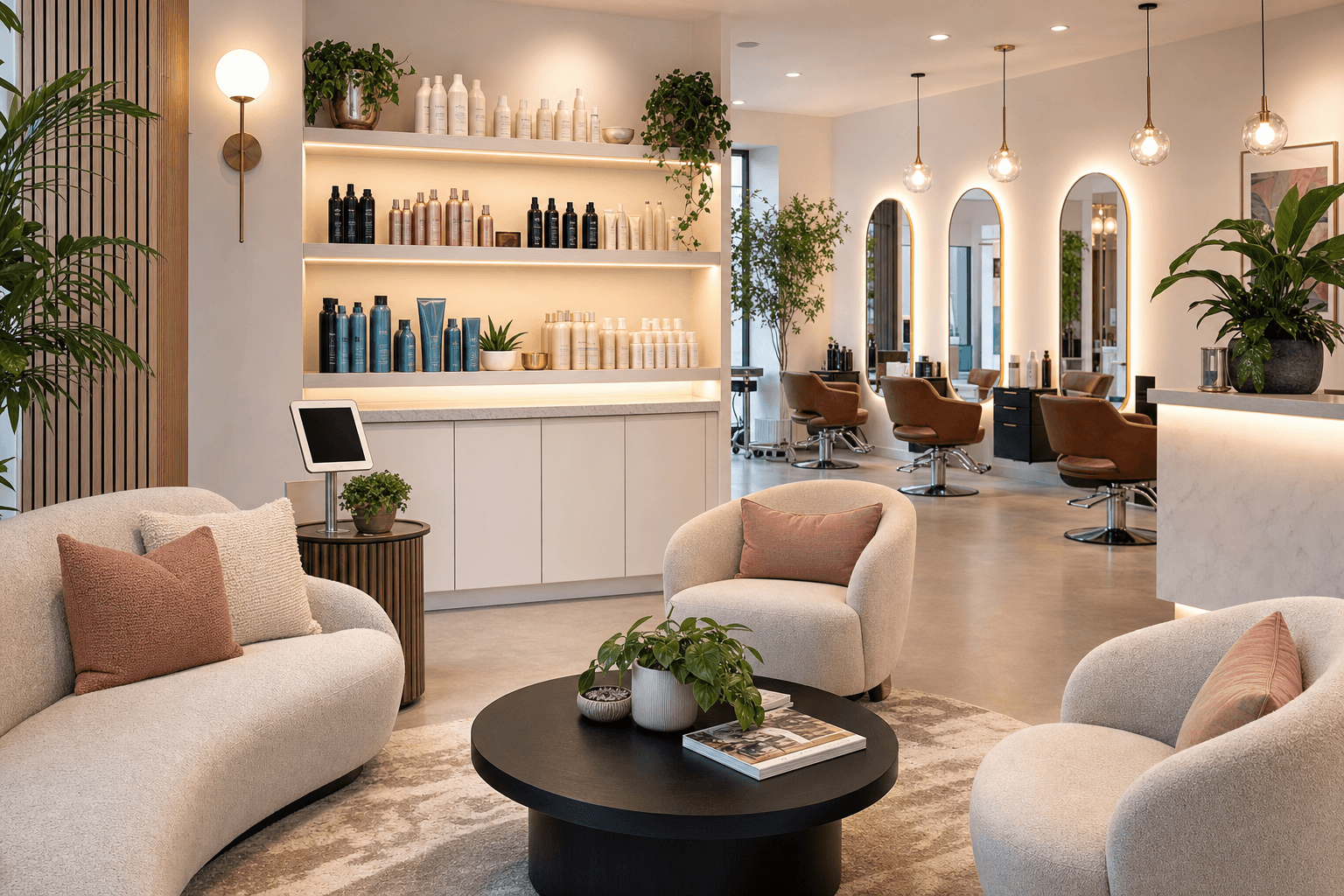
Most salon owners treat the waiting area as a holding pen — a place clients sit until their stylist is ready. That's a missed opportunity. The average salon client waits somewhere between 5 and 15 minutes before their appointment begins, and that window is one of the most underused revenue touchpoints in the entire business.
A client sitting in your waiting area is already bought in. They chose you, they showed up, and they have nothing to do but look around. That's a rare moment of undivided attention. With the right setup, you can use that time to introduce add-on services, move retail product, prompt a rebook, or collect information that makes their next visit better. None of this requires a big budget or a full redesign. It requires intention.
Here's how to do it.
Start With What Clients Actually See
Walk into your waiting area and sit down. Look around with fresh eyes. What does a client see in the first 30 seconds? If the answer is a stack of old magazines, a blank wall, and a reception desk with a computer monitor facing away from them, you have a lot of room to improve.
The waiting area sets the tone for the entire visit. It's the first real impression of your brand beyond the exterior. Before you add any revenue-generating elements, make sure the space is clean, cohesive, and reflects the quality of the services you provide. Clients don't buy from businesses they don't trust, and trust starts with how a place looks and feels.
Once the basics are solid, you can layer in the tools that actually drive revenue.
Use a Digital Service Menu as Your Silent Salesperson
One of the highest-leverage things you can put in your waiting area is a digital salon menu — either on a wall-mounted screen, a tablet stand, or accessible via a QR code on the seat-side table. Here's why it works so well.
When clients are waiting, they're in a browsing mindset. They're not in a hurry. They're open to discovering services they didn't know you offered. A well-structured digital menu does the selling for you — no pushy pitch required.
The key is presentation. Your menu shouldn't just be a price list. It should:
- Group services logically — color, cut, treatment, styling — so clients can scan quickly
- Include short descriptions that explain what each service does and who it's for
- Highlight add-ons near the services they're most likely booked for (a scalp treatment next to color services, a gloss next to a cut)
- Show before/after or results photography where possible to make services feel tangible
- Feature seasonal promotions or new services prominently at the top
A client who came in for a trim and sees a "Keratin Smoothing Treatment" described as "eliminates frizz for up to 12 weeks" might ask about it. That conversation — which your stylist didn't have to initiate — is worth hundreds of dollars over a year.
The same approach applies to nail salons and spas. A spa service menu displayed in the waiting area gives clients time to browse add-ons like paraffin treatments, extended massages, or specialty facials before they even sit down with their technician.
Deploy QR Codes Strategically
A QR code on a small card or table tent in your waiting area is one of the simplest tools you can add today. When scanned, it can take clients to your digital menu, your booking page, your retail shop, or a loyalty sign-up — depending on what you want to prioritize.
The trick is to give people a reason to scan. "View our full service menu" is a weak prompt. Try these instead:
- "See our new fall color menu" — seasonal urgency creates curiosity
- "Book your next appointment before you leave — skip the front desk line" — convenience is a strong motivator
- "Browse our retail picks — ask us about any product you see" — opens a natural sales conversation
- "Take our 60-second hair quiz and get a personalized treatment recommendation" — interactive and flattering
You can generate and manage these QR codes easily with a QR code menu generator, and update the destination link any time without reprinting the physical card. That flexibility matters — your promotions change, your menu changes, and your QR code should keep up.
Turn Retail Displays into a Buying Moment
Retail is one of the most underdeveloped revenue streams in salons. Industry data consistently shows that most salons capture far less retail revenue than they could — not because clients don't want products, but because the purchase moment is awkward. Recommending a product at the end of a service can feel like a sales pitch. But browsing a well-designed retail display while waiting? That's just shopping.
Position your retail products where waiting clients can see and ideally touch them. A shelf or small display unit near the seating area works well. A few practical tips:
- Keep it curated. Don't display every product you carry. Pick 6–10 hero items that you genuinely recommend and that solve common problems (frizz, color fade, dry scalp).
- Add small handwritten or printed shelf talkers — a one-line description of what the product does and who it's for. "For color-treated hair that loses shine fast" is more persuasive than a brand name alone.
- Tie products to services. If you offer a bond-building treatment, display the at-home maintenance product next to a card that explains how to extend the results.
- Use your digital menu to feature retail. A dedicated "Products We Love" section on your service menu — accessible via QR code in the waiting area — lets clients browse with photos, descriptions, and prices before they ask.
For more on this approach, see how to use a digital menu to showcase salon retail products and boost sales.
Use Wait Time to Collect Intake Information
Waiting clients have time to fill out a form. Most salons that use intake forms ask clients to fill them out on paper at the front desk — rushed, in front of other people, with a clipboard balanced on their lap. That's not ideal for getting honest, useful information.
A QR code in the waiting area that links to a short digital intake form changes that dynamic entirely. Clients can fill it out on their phone, at their own pace, before their stylist even comes to greet them. You get better data. They feel more heard.
Useful intake information includes:
- Current hair concerns or goals
- Products currently in use at home
- Allergies or sensitivities
- How they heard about you (useful for marketing attribution)
- Whether they'd like a service or product recommendation today
That last question is particularly powerful. A client who says "yes" to a recommendation has already opted in to the conversation. Your stylist isn't selling — they're fulfilling a request.
Prompt Rebooking Before the Service Starts
Most rebooking happens — or doesn't happen — at checkout. By then, clients are often in a rush, distracted by payment, and mentally already out the door. The waiting area gives you a second, lower-pressure window to plant the rebooking seed.
A simple card or digital prompt in the seating area that says something like: "Most of our color clients rebook every 6 weeks to maintain vibrancy. Ask your stylist about locking in your next date today." This isn't pushy. It's informative. It positions rebooking as a best practice, not a sales tactic.
You can also use the QR code in the waiting area to link directly to your booking page. Some clients — especially introverted ones — would much rather book their next appointment on their phone than negotiate a date at the front desk. Make it easy for them.
Leverage Social Proof While Clients Wait
The waiting area is an ideal place to reinforce why clients made the right choice coming to you. A rotating digital display — even a simple tablet on a stand — showing real client photos, Google reviews, or before-and-after transformations builds confidence and often sparks service curiosity.
A client who sees a stunning balayage result on screen might think, "I've always wanted to try that." That thought, combined with a service menu that explains what balayage is and what it costs, can turn into a booked appointment — sometimes that same day, sometimes at the next visit.
If you don't have a screen, printed lookbooks work too. Keep them current (update seasonally) and make sure they represent the range of services you offer, not just the dramatic transformations.
Design the Space to Encourage Conversation
Revenue in a salon often flows through conversation. The waiting area should make it easy for clients to engage with your staff — not create a barrier. A few design principles that help:
- Position the reception desk so staff can make eye contact with waiting clients. A simple smile and acknowledgment keeps clients comfortable and opens the door to casual conversation about services.
- Keep the area quiet enough for conversation. Loud music or a blaring TV makes it hard to ask a question. Background music at a comfortable volume is fine — chaos is not.
- Train your front desk staff to briefly mention one service or promotion when clients check in. "We just added a scalp detox treatment to the menu — it's been really popular this month" is a natural, non-pushy opener.
Measure What Works
None of this matters if you don't track results. A few simple metrics to watch:
- Add-on service rate: What percentage of appointments include at least one add-on? Track this monthly.
- Retail attach rate: How many clients purchase a product on a given visit? Even moving from 5% to 15% is meaningful revenue.
- QR code scan rate: Most QR platforms show you how many times a code has been scanned. If it's low, change the prompt or placement.
- Rebooking rate at checkout: If this improves after you add waiting-area rebooking prompts, you know the nudge is working.
You don't need sophisticated software for any of this. A simple spreadsheet tracked weekly is enough to see trends and make decisions.
Putting It All Together
The waiting area revenue playbook isn't complicated. Here's a simple priority order if you're starting from scratch:
- Clean up and brand the space — make it feel intentional
- Add a QR code that links to your digital service menu
- Set up a curated retail display with shelf talkers
- Add a rebooking prompt — card, digital screen, or QR link to booking page
- Train front desk staff on one service mention per check-in
- Track your add-on and retail rates monthly
Each of these steps is low-cost and reversible. You're not committing to a renovation — you're making your existing space work harder. The clients are already there. You've already paid to acquire them. Now give them a reason to spend a little more, book a little sooner, and leave a little more satisfied.
Frequently Asked Questions
What's the easiest first step to monetize my salon waiting area?
Start with a QR code linked to your digital service menu. Print it on a small card or table tent and place it in the seating area. It costs almost nothing, takes minutes to set up, and immediately gives waiting clients something useful to engage with. From there, you can layer in retail displays and rebooking prompts.
How do I get clients to actually scan the QR code?
The prompt matters more than the code itself. Instead of "scan to view menu," try something specific and benefit-driven: "Scan to see our new fall treatments" or "Book your next visit in 30 seconds — skip the front desk." Curiosity and convenience are the two strongest motivators.
Should I use a tablet screen or a wall-mounted display in the waiting area?
Either works, but a tablet on a small stand is more flexible and much cheaper to start. You can update what's on screen instantly, move it around, and use it for multiple purposes (menu, intake form, rebooking link). A wall-mounted display makes sense once you've confirmed the content is working and you want a more polished look.
How do I introduce retail without feeling like I'm pushing products?
Let the environment do the work. A well-labeled retail display with short descriptions of what each product solves removes the need for a pitch. When clients ask about something they saw while waiting, your staff is responding to interest — not initiating a sale. That shift in dynamic makes the conversation feel completely natural.
Can these strategies work for a small salon with limited waiting space?
Absolutely. Even a single chair with a small side table is enough room for a QR code card and one or two featured products. The strategies scale down easily. Focus on the highest-impact element for your business — usually the digital menu QR code — and build from there as space and budget allow.
Ready to put your waiting area to work? Browse MenuHoster's salon menu templates to build a polished digital service menu in minutes — no design skills required. With a plan that fits any budget, you can have a scannable, always-up-to-date menu in your waiting area before your next client walks through the door. Try MenuHoster free and start turning idle wait time into real revenue.
MenuHoster Team
Helping restaurants go digital