How to Create a QR Code Booking Link for Your Salon (and Where to Put It)
Updated:
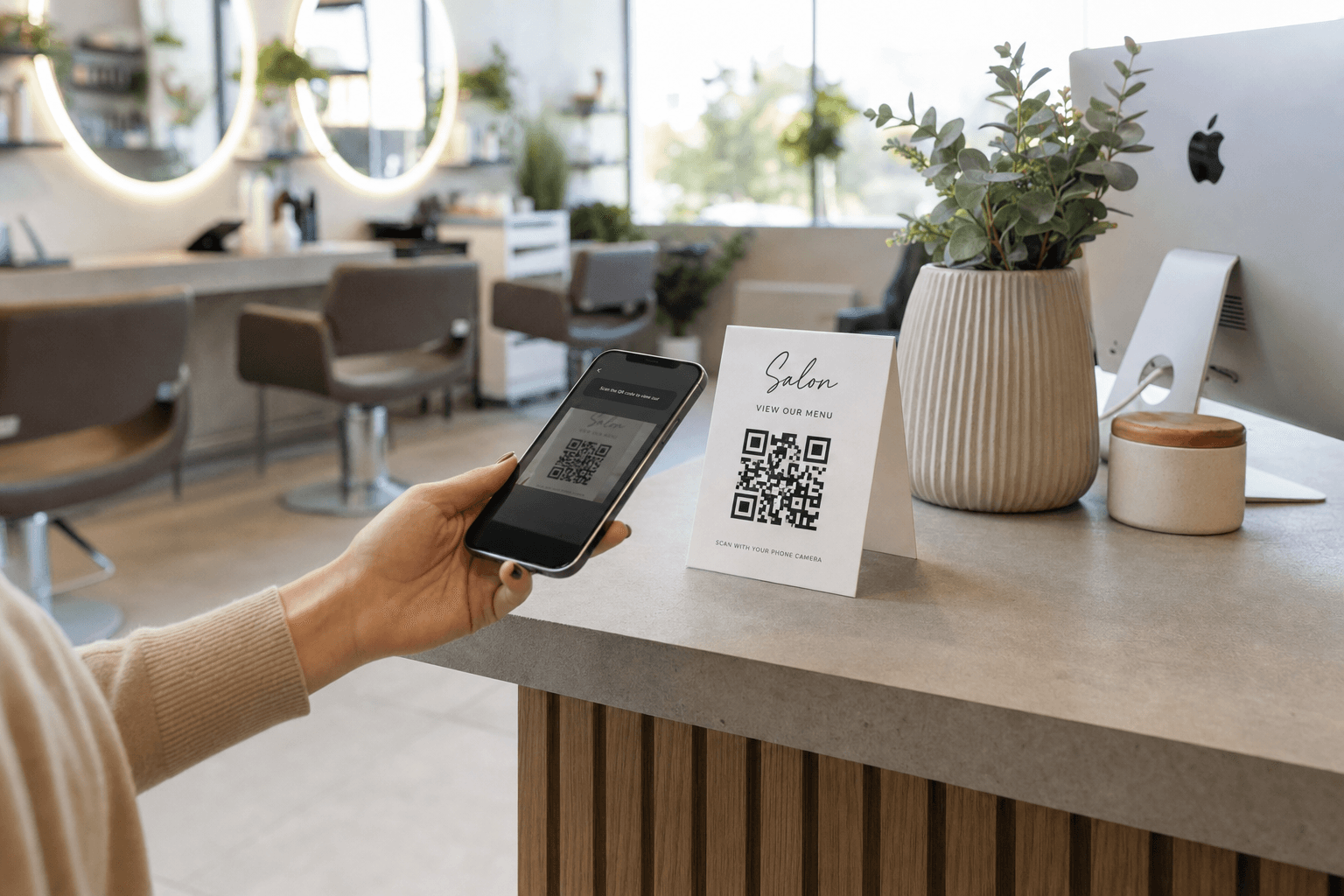
Walk-ins are unpredictable. Phone calls during a busy Saturday are a nightmare. And texting your personal number to every new client is a recipe for burnout. A QR code that links directly to your booking page solves all three problems — quietly, cheaply, and permanently.
This guide walks you through exactly how to build a QR code booking link for your salon, what to put behind it, and where to place it so clients actually scan it and book. No tech background required.
Why a QR Booking Link Works for Salons
A QR code is just a scannable shortcut to a URL. When a client points their phone camera at it, they land on whatever page you've linked — your booking form, your service menu, your online scheduler. That's it.
The reason it works especially well for salons, barbershops, nail studios, and spas comes down to three things:
- Clients already have their phones out. They're scrolling while they wait, checking their reflection, or texting a friend. A QR code meets them exactly where they are.
- It removes friction. Typing a URL is annoying. Searching Google and hoping they find the right page is risky. One scan takes them directly to your booking form.
- It works 24/7. Your QR code doesn't take a lunch break. A client who walks past your window at 9 p.m. can still book an appointment for next week.
The barrier to setting this up is genuinely low. You can have a working QR code booking link in under 30 minutes.
Step 1: Set Up Your Booking Destination Page
Before you generate a QR code, you need somewhere worth sending people. The page your QR code links to should do three things clearly:
- Show your services and prices. Clients want to know what they're booking before they commit. A clear service menu with prices builds trust and reduces "how much is a balayage?" phone calls.
- Make booking obvious. A prominent "Book Now" button or an embedded scheduling widget should be impossible to miss.
- Work on mobile. Every single person scanning your QR code is on a phone. If your page is slow, hard to read, or requires pinching and zooming, they'll bounce.
If you don't already have a clean, mobile-friendly service page, this is the right moment to build one. MenuHoster lets you create a professional salon menu page that lists your services, prices, and a direct booking link — all optimized for mobile and ready to link from a QR code.
Once your destination page is live and you have its URL, you're ready for the next step.
Step 2: Generate Your QR Code
You don't need expensive software. There are several reliable free and low-cost tools for generating QR codes:
- QR Code Generator (qr-code-generator.com) — free tier available, clean interface
- Canva's QR code tool — useful if you're already designing print materials in Canva
- GoQR.me — simple, no account required
- MenuHoster's built-in QR code menu generator — generates a QR code directly tied to your digital menu or service page
Static vs. Dynamic QR Codes
This distinction matters. A static QR code encodes the URL permanently. If you ever change your booking link, you'd need to reprint every QR code. A dynamic QR code uses a redirect URL, so you can update the destination without reprinting anything.
For a salon, dynamic is almost always worth it. Booking software changes. URLs get updated. Spend a few dollars a month on a dynamic QR service (most good generators offer this) and save yourself the headache later.
Design Your QR Code to Match Your Brand
A plain black-and-white QR code works fine, but a branded one gets scanned more. Most generators let you:
- Change the color to match your salon palette
- Add your logo in the center
- Round the corners for a softer, modern look
Keep contrast high — a light-colored code on a white background won't scan reliably. Test every design variation on at least two different phones before printing.
Step 3: Add a Clear Call to Action
A QR code alone doesn't tell anyone what will happen when they scan it. Always pair your QR code with a short instruction. Something like:
- "Scan to book your appointment"
- "See our services & book online"
- "Book in 60 seconds — scan here"
This single line of text dramatically increases scan rates. People are more likely to engage when they know exactly what they'll get. Keep it short, action-oriented, and benefit-focused.
Where to Put Your QR Code Booking Link
Generating the QR code is the easy part. Placement is where most salon owners leave money on the table. Here are the highest-impact locations, broken down by where clients are in their journey.
Inside the Salon: Capture Clients While They're Already There
Reception desk card or tent. This is your #1 placement. Every client who checks in or checks out passes this spot. A small printed card with your QR code and "Book your next visit before you leave" captures rebooking at the exact moment clients are most satisfied — right after their service.
Mirrors at each station. Stylists are often too busy finishing a client to have a full rebooking conversation. A small QR code sticker or card tucked into the mirror frame lets clients scan and book while they're still in the chair, admiring their new look.
Waiting area. Clients waiting for color to process or for their turn have nothing to do but scroll. A small sign or table card with your QR code gives them something useful to do — and they might book their next appointment right then.
Product shelves. If you retail hair, skin, or nail products, a small card near the products that says "Love what we use? Book a service" bridges retail browsing with appointment booking.
Your Salon Window and Door: Capture Walk-By Traffic
Window cling or poster. Anyone walking past your salon who glances in is a potential client. A window display with your QR code, a photo of your work, and a "Book Online" message turns passive foot traffic into booked appointments — even when you're closed.
Front door decal. Simple and effective. "We're fully booked today — scan to reserve your spot" turns a walk-in rejection into a future booking.
Print Materials: Make Everything Scannable
Business cards. Every business card you hand out should have your QR code on the back. When someone asks "do you have a card?" they're interested — make it effortless for them to book.
Appointment reminder cards. If you give clients a physical reminder card after they book, add your QR code with "Need to reschedule? Scan here." It saves you phone calls and gives clients a self-serve option.
Loyalty cards. If you run a stamp-card loyalty program, put your QR code on the card. Clients carry it with them, which means your booking link travels with them.
Packaging and bags. If you sell retail products, a small sticker or printed insert in the bag with your QR code keeps your salon top of mind after the client leaves.
Digital Placements: Extend Your Reach Online
Instagram and Facebook bio. Your booking link should be the link in your bio. You can also share your QR code as a post or story graphic — "Save this to book your next appointment."
Google Business Profile. Add your booking link directly to your Google Business Profile under the "Appointments" section. Clients who find you on Google Maps can book without ever visiting your website.
Email signature. Every email you send — confirmations, follow-ups, newsletters — should include your booking link or a small QR code image. It's a zero-effort touchpoint.
Your digital menu or service page. If you use a digital menu for your salon services, make sure your booking link is prominent on every page. Clients browsing your services are already in the right mindset — don't make them hunt for the "Book" button.
What Makes Clients Actually Scan
Placement is necessary but not sufficient. Here's what separates QR codes that get scanned from ones that get ignored:
Size Matters
A QR code smaller than 1 inch square is hard to scan reliably. For printed materials, aim for at least 1.5 inches. For window displays meant to be scanned from a few feet away, go larger — 4 to 6 inches minimum.
Contrast Is Non-Negotiable
Dark code on a light background. Always. Cute low-contrast designs look great in mockups and fail in real life.
Test Before You Print
Scan your QR code from the same distance a client would. Test it on an iPhone and an Android. Make sure the destination page loads in under three seconds on a mobile connection. A slow-loading booking page kills conversions just as surely as a broken link.
Keep the Destination Simple
The page your QR code links to should have one job: get the client to book. Avoid sending them to a homepage with a dozen navigation options. A focused spa or salon service page with a clear booking button outperforms a cluttered website every time.
Tracking and Improving Your Results
If you're using a dynamic QR code, you can track how many times it's been scanned, from which locations, and at what times. This data is genuinely useful:
- If your window QR code gets far more scans than your reception desk card, double down on window placement.
- If scans spike on weekday evenings, that's when people are browsing — consider running a promotion at that time.
- If scans are high but bookings are low, the problem is your landing page, not your QR code placement.
Treat your QR code like any other marketing tool: measure it, adjust it, improve it.
Common Mistakes to Avoid
- Linking to a page that isn't mobile-optimized. This is the single biggest failure point. Check your destination on a real phone, not just a browser window resized to look small.
- No call to action. A bare QR code with no context gets ignored. Always tell people what they'll get when they scan.
- Printing without testing. Print a small test batch, scan them in the actual location they'll be displayed, and confirm everything works before ordering 500 business cards.
- Using a static QR code for a URL that might change. If your booking software changes or you move platforms, a static code becomes useless overnight.
- Placing QR codes where there's no phone signal. A basement treatment room or a spot with poor WiFi will frustrate clients. Test connectivity at every placement location.
Frequently Asked Questions
Do I need a special app to generate a QR code for my salon?
No. There are many free web-based tools that generate QR codes without requiring an app download. For salons that want their QR code tied directly to a professional service menu page, MenuHoster's built-in generator handles both in one place.
What should my QR code link to — my booking software or a service menu?
Ideally, link to a page that shows your services and prices first, with a clear "Book Now" button. Sending clients directly into a booking form without context can cause drop-off. A service menu page that leads naturally into booking converts better than a cold booking form.
How do I update my QR code if I change booking platforms?
If you used a dynamic QR code, you simply log into your QR code provider and update the destination URL. The printed QR codes stay the same — only the redirect changes. This is why dynamic QR codes are worth the small monthly cost for a business that might evolve its tools.
Can I use the same QR code in multiple locations?
Yes, but for tracking purposes it's better to generate a separate dynamic QR code for each placement location. That way you can see which location drives the most scans and optimize accordingly.
My clients tend to be older — will they know how to scan a QR code?
Most modern smartphones (iOS and Android) scan QR codes natively through the camera app — no separate app needed. Adding a short note like "Open your camera app and point it here" next to the QR code removes any uncertainty for clients who haven't done it before.
Ready to give your clients a faster, easier way to book? Browse MenuHoster's salon templates to build a mobile-ready service page in minutes, then generate your QR code and start placing it where your clients already are. It takes less than an hour to set up — and it works for you every day after that. See MenuHoster's pricing and get started today.
MenuHoster Team
Helping restaurants go digital