Salon Instagram Marketing: Before-and-After Content That Books Clients
Updated:
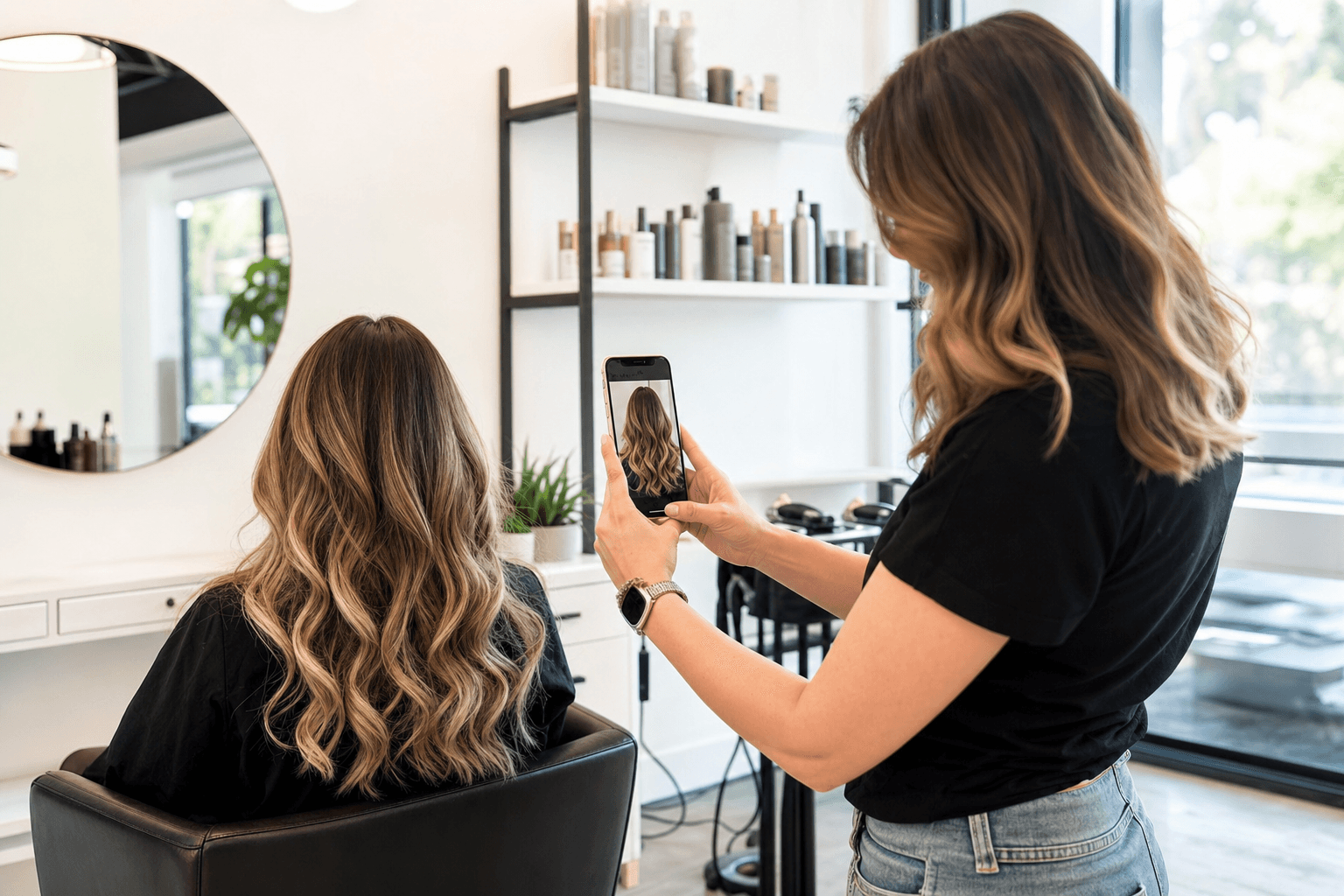
Before-and-after posts are the single most effective organic content format for salons on Instagram. They show real proof of skill, they stop the scroll, and — when done right — they make the viewer think "I want that." But most salon owners post them wrong: bad lighting, no context, weak captions, and zero call to action. The result is a few likes from regulars and no new bookings.
This guide covers every step — from how to shoot the photos to what to write in the caption — so your before-and-afters actually convert followers into clients sitting in your chair.
Why Before-and-Afters Work So Well for Salons
Instagram is a visual platform, and transformation content is inherently visual. A before-and-after image does three things at once:
- Demonstrates skill. No one has to take your word for it. The result is right there.
- Creates desire. Viewers imagine themselves in the after photo. That's the moment a follower becomes a potential client.
- Builds trust. Real client photos (not stock images) signal authenticity. People can tell the difference.
The challenge is that every salon posts before-and-afters. To stand out and actually drive bookings, you need to be more intentional than just snapping two photos and hitting publish.
Getting the Shot: Photography Basics That Make a Real Difference
You don't need a professional camera. A modern smartphone is more than enough — but you do need to control the variables that separate a compelling photo from a forgettable one.
Light is everything
Natural light is your best friend. Position your client near a window, facing it, so the light falls evenly on their hair or nails. Avoid overhead salon lighting as your only source — it creates harsh shadows and distorts color. If your salon doesn't have great natural light, invest in a ring light ($40–$80) and place it directly in front of the client. Use the same lighting setup for both the before and after shots so the comparison is fair and clear.
Shoot the before photo first — every time
This sounds obvious, but it's the most common mistake. Stylists get excited about the transformation and forget to capture the before. Make it a non-negotiable habit: as soon as the client sits down and before you touch their hair, take the photo. Set a reminder on your phone if you need to.
Consistent angles and framing
The before and after must be shot from the same angle and distance. If the before is a close-up from the side and the after is a wide shot from the front, the comparison loses its impact. Pick your angle — usually straight-on or a three-quarter view — and stick to it for both shots.
Clean, neutral backgrounds
A cluttered background pulls attention away from the hair or nails. Find a plain wall in your salon, hang a simple backdrop, or use a spot where the background is uncluttered. Consistency in your background also helps build a recognizable visual identity for your feed over time.
Side-by-side vs. swipe format
Instagram's carousel format (swipe left) works extremely well for before-and-afters. Put the before on the first slide and the after on the second. This creates a natural moment of surprise and encourages engagement. Alternatively, use a side-by-side collage for a single image post — apps like Layout or Canva make this easy. Both formats perform well; test both to see what your audience responds to.
What Services Photograph Best
Not every service produces a dramatic visual transformation, but more do than you might think. Here's how to approach the most common ones:
Hair color and highlights
The most naturally dramatic before-and-afters. Color corrections, balayage, vivid colors, and grey coverage all photograph beautifully. Focus on shine and dimension in the after shot — a slight tilt of the head and a light source hitting the hair at an angle shows depth.
Haircuts and styling
Shape and volume are harder to capture than color. Use a side profile or back shot to show the cut's structure. For blowouts and styling, movement matters — ask the client to gently toss their hair or look to the side to capture the volume.
Nail art and manicures
Shoot nails in natural light with a macro or portrait mode. A flat lay of both hands on a clean surface works well. Show the before with bare or grown-out nails, and the after with a close-up that captures the detail of the work.
Brows, lashes, and facial treatments
These require close-up shots. Make sure the client is comfortable being photographed at close range. For brows and lashes, a straight-on face shot with good lighting shows the full impact. For skin treatments, consistency in lighting and angle is critical — even small differences in light can make the skin look better or worse regardless of the treatment.
Barbershop fades and beard trims
Side profile and back-of-head shots are essential here. The taper and fade lines are the story — make sure they're visible. A clean, dark background helps the hairline stand out.
Writing Captions That Actually Convert
Most salon Instagram captions look like this: "✨ Transformation Tuesday! Love this color 💕 #hairgoals #balayage." That caption does nothing to book a new client. Here's what a converting caption looks like instead.
Lead with the transformation story
Describe what the client came in with and what they wanted. "This client came in with 3 inches of grown-out highlights and wanted a warmer, sun-kissed look without the harsh line of demarcation." This gives context and helps viewers who have the same problem recognize themselves in the post.
Explain your process briefly
One or two sentences about what you did builds credibility and positions you as an expert. "We used a lived-in balayage technique with a toner to neutralize the brassiness and add warmth." You don't need to give away every detail — just enough to show you know what you're doing.
Include the specific call to action
Tell people exactly what to do next. "Ready for your own transformation? Link in bio to book, or DM me directly and I'll find you a spot this week." Vague CTAs like "book now!" underperform. Specific, low-friction instructions work better.
Use relevant hashtags strategically
Instagram hashtags still drive discovery, but quality beats quantity. Use a mix of: location-based tags (#ChicagoHairStylist, #AustinSalon), service-specific tags (#Balayage, #NailArt, #BarberFade), and niche community tags (#NaturalHairSalon, #BridalHair). Aim for 10–15 focused hashtags rather than 30 generic ones. Put them at the end of the caption or in the first comment.
Tag your products
If you used specific color brands or nail products, tag them. Product brands often reshare client work, which can expose your content to a much larger audience at zero cost.
Getting Client Consent the Right Way
Always ask permission before posting a client's photo. Make it part of your intake process — a simple verbal confirmation or a checkbox on your intake form works fine. Most clients are happy to be featured, especially if you mention you'll tag them. Some clients prefer not to be recognizable on social media; respect that immediately and don't push back. A few best practices:
- Ask before you start the service, not after. It avoids awkwardness.
- Offer to tag their personal account — many clients love the exposure.
- Keep a simple digital or paper log of who has consented.
- Never post photos of minors without explicit written consent from a parent or guardian.
Posting Schedule and Consistency
Consistency matters more than frequency on Instagram. Three well-crafted posts per week will outperform seven rushed ones. For before-and-afters specifically, aim for at least two per week. Build a simple content calendar:
- Monday or Tuesday: Before-and-after from the previous week's best work.
- Thursday or Friday: Another transformation, ideally a different service type to show range.
- Weekend: A reel, a behind-the-scenes Story, or a client testimonial post.
Reels featuring before-and-after transitions currently get significantly more reach than static posts. A simple swipe or zoom transition in CapCut or Instagram's built-in editor takes under five minutes to create and can dramatically increase how many new people see your work.
Turning Instagram Engagement Into Actual Bookings
Getting likes and comments is nice, but bookings pay the bills. The gap between engagement and booking usually comes down to friction — the process of going from "I love this" to "I'm booked" is too many steps.
Make your booking link obvious
Your Instagram bio should have one clear link — to your booking page or your online menu. Use a link-in-bio tool or link directly to your booking system. Mention the link in every caption.
Respond to every DM quickly
When someone DMs you after seeing a transformation post, they're hot. Respond within a few hours with specific availability. Every hour of delay reduces the chance they book. Set up Instagram's quick replies feature for common questions about pricing and availability.
Show your service menu in your profile
Many potential clients want to know pricing before they reach out. Linking to a clear, professional salon menu in your bio removes a major barrier. When people can see exactly what a balayage or a full set costs, they self-qualify — and the ones who DM you are already ready to book.
A digital menu for your salon also looks far more professional than a PDF or a list buried in your highlights. It signals that you run a serious business, which builds confidence in first-time clients.
Use Stories to create urgency
Post a Story when you have a cancellation opening or a last-minute slot. "I just had a cancellation for tomorrow at 2pm — full balayage slot. DM me now if you want it." Scarcity and immediacy drive action. Do this consistently and your followers will start watching your Stories just in case a slot opens up.
Common Mistakes That Kill Your Results
- Posting only your best work. Counterintuitively, a mix of "everyday great" work alongside your showstoppers feels more authentic and relatable than a feed of only dramatic transformations.
- Inconsistent visual style. Wildly different lighting, backgrounds, and editing styles make your feed look chaotic. Pick a simple editing preset and apply it consistently.
- No location information. If your location isn't in your bio, your handle, or your hashtags, local clients can't find you. Always include your city in your bio and use local hashtags.
- Ignoring comments. Replying to comments signals to the algorithm that your post is engaging, and it signals to potential clients that you're responsive and personable.
- No link to pricing or booking. If someone has to DM just to find out how much a service costs, many will simply move on. A spa or salon service menu linked in your bio solves this instantly.
Building a Sustainable Content System
The biggest reason salon owners fall off their Instagram strategy is that it feels overwhelming to maintain. The fix is to build a simple system rather than relying on motivation.
- Designate a "photo day" in your week. Every Thursday, for example, you make a point of photographing your best work that day. This creates a habit and a backlog of content.
- Batch your editing. Spend 20 minutes on Sunday editing and scheduling the week's posts using a tool like Later or Meta Business Suite. This takes posting off your daily mental load.
- Create caption templates. Write three or four caption structures that work for different service types. Fill in the specifics for each post. This cuts caption-writing time in half.
- Repurpose content. A before-and-after post can also become a Reel, a Story highlight, and a Google Business Profile photo. One shoot, multiple placements.
When your Instagram is working consistently, pair it with a professional online presence. A polished salon menu template gives new clients everything they need to make a booking decision — services, prices, and a clear next step — without you having to answer the same questions over and over in DMs.
Frequently Asked Questions
How often should a salon post before-and-after content on Instagram?
Aim for at least two before-and-after posts per week. Consistency matters more than volume — two strong, well-captioned posts will outperform five rushed ones. Build a simple weekly content calendar and batch your editing on a single day to make it sustainable.
Do I need a professional camera to take good salon photos?
No. A modern smartphone in good lighting is sufficient for Instagram-quality photos. The most important factors are natural or ring-light lighting, a clean background, and consistent angles between the before and after shots. Invest in a $50–$80 ring light before you consider buying a camera.
What should I include in my Instagram bio as a salon owner?
Your bio should clearly state what you do and where you're located, include a booking link or a link to your service menu, and have a simple call to action like "DM to book" or "Book via link below." Keep it short and scannable. Avoid filling it with emojis at the expense of useful information.
Should I show pricing on my salon's Instagram?
Yes — at minimum, link to a page where pricing is visible. Many potential clients won't DM to ask about prices; they'll just move on. Linking to a professional digital service menu in your bio removes this barrier and attracts clients who are already ready to book at your price point.
How do I get more local clients from Instagram rather than just likes from people far away?
Use location-specific hashtags (e.g., #DallasHairStylist, #BrooklynNailSalon), tag your location in every post, include your city in your bio, and geotag your posts. Instagram's location search is how many local clients discover new salons. Also, engage with other local business accounts — it signals to the algorithm that you're part of a local community.
Ready to turn your Instagram followers into booked clients? A professional digital service menu is the missing piece that bridges the gap between "I love your work" and "I'm booked." Create your salon menu on MenuHoster in minutes — no design skills needed — and give every potential client a clear, polished place to see your services, prices, and booking link. It's the simplest upgrade you can make to your Instagram strategy today.
MenuHoster Team
Helping restaurants go digital