How to Use Menu Item Badges (New, Popular, Chef's Pick) to Drive Orders
Updated:
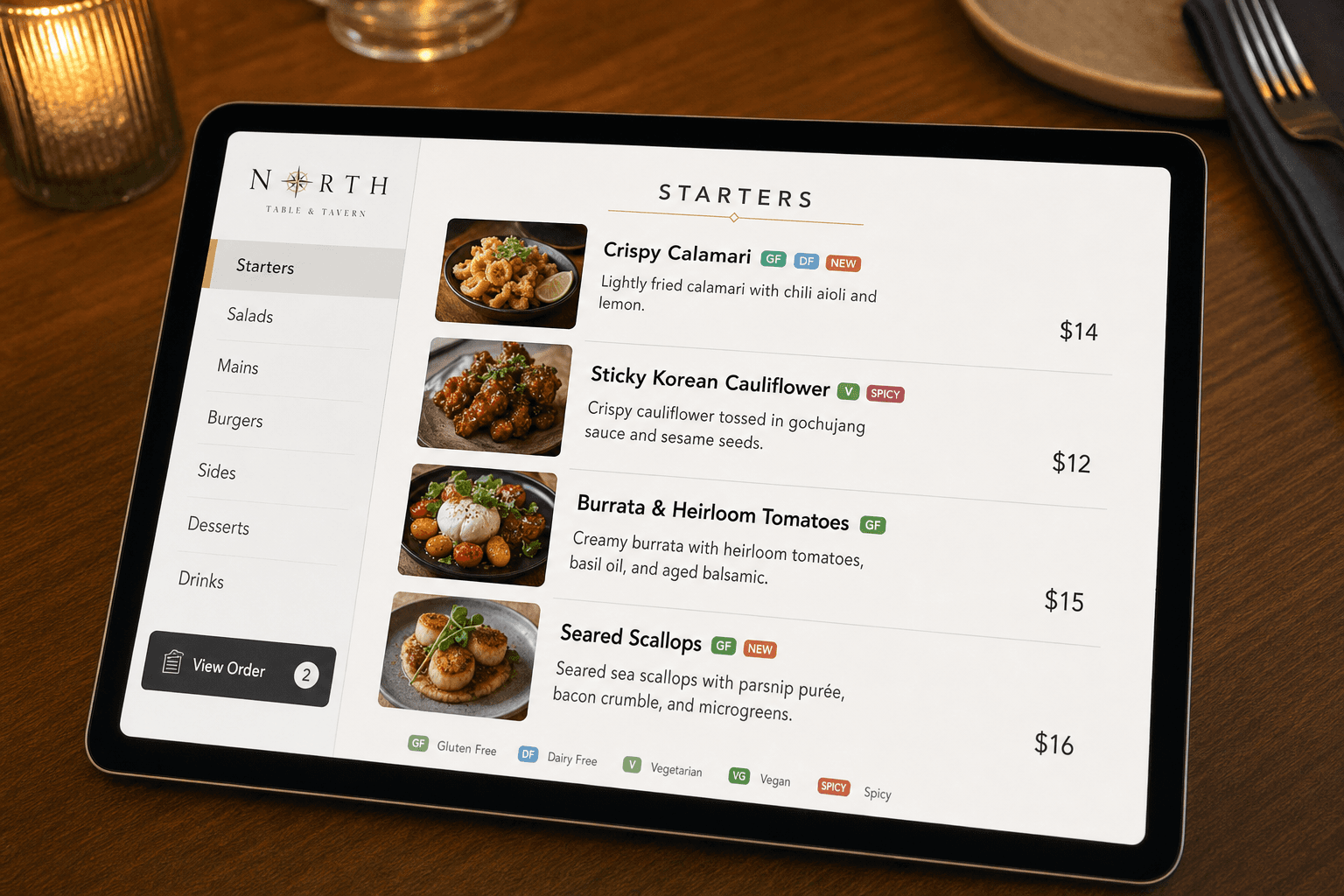
A guest opens your menu and faces thirty decisions in sixty seconds. Without guidance, most people default to what they already know — or worse, they pick whatever is cheapest because they're uncertain about everything else. Menu item badges solve this problem. A small label that says Popular, New, or Chef's Pick acts as a trusted shortcut, steering attention exactly where you want it and giving guests the confidence to order something they might otherwise skip.
This guide covers how badges work psychologically, which ones to use and when, how many is too many, and how to implement them effectively on a digital menu so they actually move the needle on your revenue.
Why Badges Work: The Psychology Behind the Label
Decision fatigue is real. Research on consumer behavior consistently shows that when people face too many options with no clear signal about which is "right," they either choose poorly or disengage entirely. Menu badges work because they reduce cognitive load — they outsource part of the decision to a trusted source (your restaurant) and give the guest social or expert validation.
There are three core psychological mechanisms at play:
- Social proof: If other people are ordering it, it's probably good. A "Popular" badge taps directly into this instinct.
- Authority: A chef recommendation carries weight. Guests assume the person who created the food knows what's worth ordering.
- Novelty bias: Humans are wired to notice and investigate new things. A "New" badge draws the eye even when a guest wasn't planning to try something unfamiliar.
None of this is manipulation — it's useful information, presented clearly. The guest who orders the chef's pick is usually happier with their meal than the one who defaulted to a safe, boring choice. Done right, badges improve the dining experience while helping your bottom line.
The Core Badge Types and When to Use Each
Popular (or Best Seller)
This is the workhorse badge. Use it on items that genuinely sell in high volume — your actual top sellers by unit count, not by revenue. Guests trust it because it reflects real behavior. If you're running a restaurant menu with solid POS data, pull your top three to five items per category and badge them. Refresh this data quarterly or when you notice sales patterns shifting.
When not to use it: Don't badge an item as Popular if it's not. Guests who order a "popular" dish and find it mediocre will distrust every other badge on your menu. Authenticity is what makes the label valuable.
New
Use this badge for items you've added within the last four to eight weeks. It serves two purposes: it alerts regulars to something they haven't tried yet, and it signals to new guests that your kitchen is active and evolving. The "New" badge should have an expiration date in your mind — after two months, retire it. A badge that's been sitting there since last year is worse than no badge at all.
Pro tip: Pair the "New" badge with a brief description that explains why this item exists — a seasonal ingredient, a supplier relationship, a staff experiment that worked. Context makes novelty feel intentional rather than arbitrary.
Chef's Pick (or Chef's Recommendation)
This badge carries the most authority and should be used the most sparingly. Limit it to two or three items across your entire menu. These should be dishes the chef is genuinely proud of — items that represent the kitchen's skill, use interesting technique, or feature an ingredient the team is excited about. Chef's Pick works especially well on items that guests might overlook because they sound unfamiliar or are priced higher than average.
This badge is also a great tool for nudging guests toward high-margin items. If your food cost on a pasta dish is 22% but guests tend to order the burger at 34%, a Chef's Pick badge on the pasta can shift that mix meaningfully over time.
Spicy / Vegetarian / Vegan / Contains Allergens
These are informational badges rather than persuasive ones, but they belong in the same system. Guests with dietary needs scan for these first, and a menu that makes this information easy to find builds immediate trust. Keep the visual style consistent with your persuasive badges so the menu looks cohesive, but use a different color palette so guests can distinguish "this is a recommendation" from "this is a dietary flag."
Limited / Seasonal
Scarcity is a legitimate motivator. If something is only available on weekends, only while supplies last, or only through the end of the month, say so. "Limited" badges create urgency without pressure. Guests appreciate the heads-up, and it often prompts an order that wouldn't have happened otherwise.
How Many Badges Is Too Many?
This is where most restaurants go wrong. If you badge eight items on a twelve-item menu, the badges mean nothing — they're just decoration. The value of a badge comes from scarcity and selectivity. Here are practical limits to work within:
- Popular: No more than one per menu section (starters, mains, desserts, drinks). If everything is popular, nothing is.
- New: As many as are genuinely new, but retire them on a schedule. Two to four active at any time is typical.
- Chef's Pick: Two to three across the entire menu, full stop.
- Total badged items: Aim for no more than 15–20% of your menu items carrying any badge at all.
If you're working with a large menu, this discipline is especially important. A menu with forty items and twelve badges is visually noisy and strategically incoherent. For more on managing large menus without overwhelming guests, see our guide on how to organize a large menu so guests don't feel overwhelmed.
Badge Design That Actually Gets Noticed
A badge that blends into the menu is useless. A badge that screams is annoying. The goal is clear visual hierarchy — the badge should be immediately recognizable without dominating the item name or description.
Color and contrast
Use a small filled pill or tag shape with high contrast against your menu background. Common conventions: orange or red for Popular/Best Seller, green for New, deep blue or gold for Chef's Pick. Stay consistent — once guests learn your color code, they scan faster on repeat visits.
Size and placement
Badges work best placed immediately before or after the item name, or as a small icon in the top corner of an item card if you're using a card-based layout. They should be readable at a glance on a phone screen — roughly 12–14px text in a tight pill shape. On a digital menu, test on an actual mobile device before publishing.
Text length
One to two words maximum. "Popular," "New," "Chef's Pick," "Limited," "Spicy." The moment you write "Our Most Ordered Dish!" you've turned a badge into a sentence, and it loses its visual punch entirely.
Using Badges Strategically to Hit Business Goals
Badges aren't just about aesthetics — they're a lever you can pull to achieve specific outcomes. Here's how to think about them tactically:
Push high-margin items
Review your food cost percentages and identify items where you make the most money per plate. If those items aren't already top sellers, a Chef's Pick or Popular badge (if warranted) can shift the order mix. Even a 5% shift toward higher-margin items across a week of service adds up significantly over a year.
Move slow movers before they become waste
If you have perishable ingredients backing up, badge a dish that uses them as a "Limited" or "Today's Special." This is honest — it is limited — and it helps you manage food cost without discounting.
Test new items before committing to them
Badge a new dish as "New" and track orders for four weeks. If it underperforms even with the visibility boost, that's useful data. If it overperforms, you know you have a keeper. Badges let you run informal experiments without changing your menu structure. For a more systematic approach, see our article on how to A/B test your menu layout and pricing.
Support upsells
A Popular badge on a premium add-on (truffle fries instead of regular, a sauce upgrade, a larger pour) can increase attachment rates without any staff intervention. If you're building out an upsell strategy, badges are one of the lowest-effort tools available. Pair them with thoughtful menu structure — see our guide on how to use your digital menu to promote upsells and add-ons for the full picture.
Implementing Badges on a Digital Menu
Paper menus make badges expensive — you have to reprint every time you add or retire one. Digital menus remove that friction entirely. With an online menu maker, you can add, move, or remove badges in seconds, which means you can actually maintain the discipline of keeping badges fresh and accurate.
Here's a practical implementation workflow:
- Audit your current menu. List every item and note which ones are genuinely top sellers, which are new, and which represent your kitchen's best work.
- Apply badges conservatively. Start with fewer than you think you need. You can always add more; removing them after guests have noticed feels like a downgrade.
- Set a calendar reminder. Review and refresh badges monthly. Retire "New" badges after six to eight weeks. Update "Popular" badges when your sales data shifts seasonally.
- Check mobile rendering. View your menu on a phone after every change. Badges that look fine on a desktop can crowd a small screen.
- Train your staff. If servers are recommending items verbally, they should know which dishes carry badges and why. Consistency between the menu and the server's pitch builds trust.
Common Mistakes to Avoid
- Badging items that don't deserve it. A "Popular" badge on a slow seller is a lie guests will eventually notice.
- Never updating badges. Stale badges signal a menu that isn't being managed. Guests notice when the "New" tag has been there for eight months.
- Using too many badge types. If you have six different badge categories, guests have to learn your system before they can use it. Stick to three or four maximum.
- Inconsistent visual style. Mixing badge shapes, sizes, and colors across your menu looks unprofessional and makes the signals harder to read.
- Ignoring the data. Badges are a tool, not a decoration. If a badged item isn't selling better than its unbadged neighbors, something is wrong — with the badge, the description, the price, or the item itself.
Frequently Asked Questions
How do I decide which items get a "Popular" badge if I don't have detailed POS data?
Start with your gut and your staff. Ask your servers which dishes guests ask about most, which ones come back empty fastest, and which ones generate the most positive comments. This is imperfect but directionally accurate. As soon as you have even basic sales tracking in place, validate those assumptions with numbers and adjust accordingly.
Can I use badges on a printed menu, or are they only practical digitally?
You can use them on printed menus, but the maintenance burden is high — every badge change requires a reprint. A practical compromise is to use badges sparingly on printed menus for items that are stable long-term (your genuine top sellers), and reserve dynamic badges like "New" and "Limited" for your digital menu where you can update them freely.
How often should I rotate which items carry the Chef's Pick badge?
There's no fixed rule, but a natural cadence is to update Chef's Pick badges when you update your menu — seasonally, or whenever you introduce new dishes. The badge loses meaning if it never changes; it should reflect what the kitchen is currently excited about, not what was exciting two years ago.
Will badges work the same way on a QR code menu as on a printed menu?
Yes, and often better. On a QR menu, guests are already on a screen and accustomed to visual UI cues like tags and labels. The badge behavior is familiar from apps and e-commerce, so it reads naturally. The key is that your digital menu platform supports badge styling that looks intentional — not just a text note in parentheses.
Should I badge drinks and desserts, or just food items?
Absolutely badge drinks and desserts — these categories are where many restaurants leave money on the table. A "Popular" badge on a signature cocktail or a "Chef's Pick" on a dessert that's genuinely exceptional can meaningfully increase attachment rates for those courses. Treat every section of your menu as its own opportunity.
Ready to put badges to work on your menu? MenuHoster's online menu maker lets you add and update badges instantly, without reprinting or calling a developer. Build a cleaner, smarter menu in minutes — and start guiding your guests toward the dishes you're most proud of.
MenuHoster Team
Helping restaurants go digital