First-Time Client Experience: How Your Salon Menu and Booking Flow Sets the Tone
Updated:
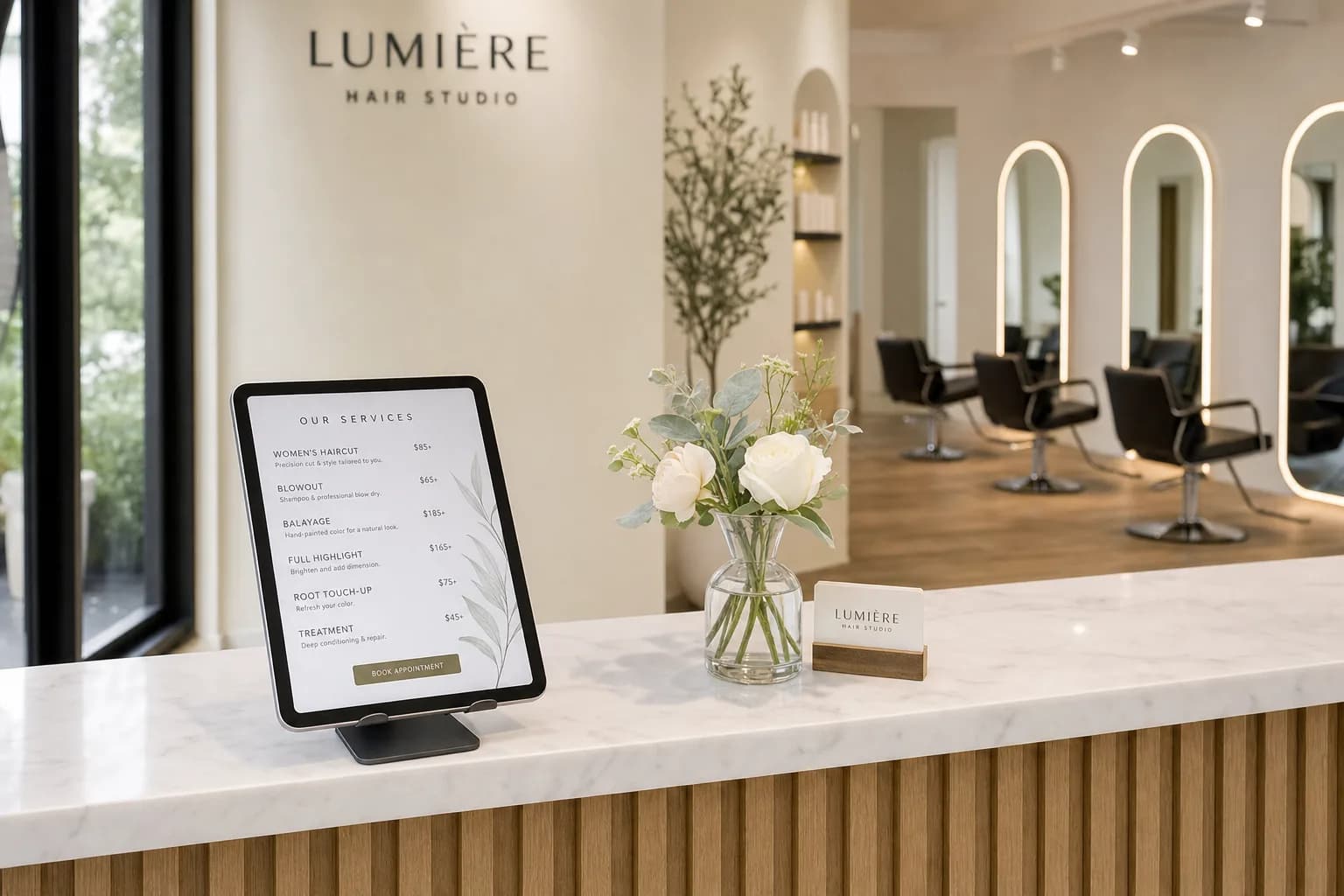
You only get one shot at a first impression. For a new salon client, that impression doesn't start when they walk through your door — it starts the moment they find your name online, click on your booking link, or scan a QR code on a friend's referral card. Every step before the appointment either builds confidence or chips away at it.
Most salon owners focus their energy on the in-chair experience: the consultation, the service, the finish. That part matters enormously. But if the path to getting there is confusing, incomplete, or unprofessional, a meaningful percentage of potential new clients will quietly drop off before they ever sit down. And the ones who do show up may arrive with the wrong expectations — which makes your job harder from the first minute.
This article walks through the two biggest pre-visit touchpoints — your salon service menu and your booking flow — and explains exactly how to get both right so that first-time clients arrive informed, excited, and ready to become regulars.
Why the Pre-Visit Experience Matters More Than You Think
Think about the last time you booked a service somewhere new. You probably did some research first. You looked at photos, read reviews, and tried to figure out what things cost. If the information was hard to find or the booking process felt clunky, you may have moved on to a competitor — not because the service was worse, but because the friction was too high.
Your new clients go through the same process. Studies on service businesses consistently show that trust is the primary barrier to conversion for first-time customers. They don't know you yet. They're evaluating signals: Is this place professional? Do they know what they're doing? Will I be surprised by the price? Will my time be respected?
Your menu and booking flow are the primary tools you have to answer those questions before the client ever speaks to anyone at your salon.
What a First-Time Client Actually Needs From Your Menu
A new client looking at your menu has different needs than a returning regular. A regular already knows what a "balayage touch-up" means in your context and roughly what it costs. A first-timer is trying to orient themselves entirely from scratch.
Clarity over comprehensiveness
Many salon menus are written for the staff, not the client. They're full of internal shorthand, vague category names, and price ranges so wide they're nearly meaningless ("Color services: $80–$300"). A first-time client reading that doesn't feel informed — they feel uncertain. Uncertainty leads to hesitation, and hesitation leads to not booking.
Prioritize plain-language descriptions. Instead of listing "Full highlights," try: "Full highlights — lightener applied throughout for an all-over brightening effect. Price varies by hair length and density; starting at $120." That one sentence answers three questions at once.
Starting prices, not hidden prices
You don't have to publish a fixed price for every service. Hair color especially varies too much for that. But you do need to give people a starting point. "Starting at $X" sets a floor, manages expectations, and filters out clients whose budget genuinely doesn't match your pricing — which saves everyone time.
Hiding prices entirely signals one of two things to a new client: either the prices are high and you're embarrassed about them, or the business isn't organized enough to have consistent pricing. Neither is the impression you want.
Service duration
Time is a major factor in booking decisions. A client who needs to pick up kids at 3pm needs to know whether a keratin treatment takes two hours or four. Include estimated service times alongside your prices. It's a small detail that shows you respect the client's schedule and removes a common reason for hesitation.
A logical structure
Organize your menu the way a new client thinks, not the way your price sheet was built. Group services by outcome or category: cuts, color, treatments, add-ons. Use clear headings. Put your most-booked services near the top. A well-structured salon menu guides a new client to the right service quickly, rather than making them scroll through a wall of text trying to figure out what applies to them.
Photos where they help
For visual services like color, extensions, or nail art, photos dramatically reduce uncertainty. A client who can see an example of a "lived-in blonde" knows immediately whether that's what they want. You don't need a photo for every service — a blowout doesn't need a picture — but for anything where the result varies significantly by interpretation, visuals do real work.
The Digital Menu Advantage
A printed service menu handed over at the front desk is fine. But a digital menu that lives online and can be accessed before the visit does something a printed menu never can: it answers questions at 10pm on a Tuesday when the client is deciding whether to book.
When a potential new client finds your salon on Instagram or Google and clicks through to your website, if your services and prices are easy to find and clearly presented, you've just done the equivalent of a great front-desk greeting — without anyone being there. That's the leverage a digital menu gives you.
A QR code menu extends this further. You can put a QR code on your business cards, in your Instagram bio, on referral cards, and at your reception desk. A new client referred by a friend can scan the code and see your full service list in seconds. That moment of easy access is itself a positive signal about how you run your business.
Keep your digital menu current. Nothing erodes trust faster than a new client who books based on a price they saw online and arrives to find the price is different. Update your menu whenever your pricing or services change — a digital menu makes this fast and easy.
Building a Booking Flow That Builds Confidence
Your booking flow is the sequence of steps a client takes from deciding they want an appointment to having one confirmed. Every unnecessary step, every confusing moment, every unanswered question in that sequence is a place where a first-timer can drop off.
Make booking easy to find
This sounds obvious, but many salons bury their booking link. It should be visible without scrolling on your website homepage, in your Instagram bio, and ideally linked directly from your digital menu. If someone has to hunt for how to book, some of them won't bother.
Let people book online
Phone-only booking is a significant barrier for new clients. Many people — especially younger clients — prefer not to call. They want to book at their own pace, without having to explain what they want to someone they've never spoken to. Online booking removes that friction entirely. If you're not offering it, you're losing bookings to salons that do.
Ask the right intake questions
The booking form is your first real conversation with a new client. Use it wisely. A few targeted questions — current hair color, desired outcome, any chemical services in the past six months — do two things: they help you prepare for the appointment, and they signal to the client that you're thorough and professional. Don't ask for so much that the form feels like a job application, but don't ask for so little that you arrive at the appointment blind.
Send a confirmation that actually informs
Your booking confirmation email or text should do more than confirm the date and time. Include:
- The service booked and who they're seeing
- Your address with a link to directions
- Parking information if it's not obvious
- What to expect on arrival (check in at the front desk, arrive 5 minutes early, etc.)
- Your cancellation policy, clearly stated
- A contact number in case they have questions
A well-crafted confirmation email is a powerful trust signal. It tells the client: this salon is organized, they're expecting me, and they've thought about my experience. That's exactly the impression you want a first-timer to have before they walk in.
Send a reminder — and make it useful
A 24–48 hour reminder reduces no-shows and also gives first-time clients a chance to ask last-minute questions. Keep it brief, but include the key details again: time, address, stylist name, and your cancellation window. If your salon service menu is online, linking to it in the reminder gives the client a chance to review what they booked and feel prepared.
Aligning Your Menu and Booking Flow for Consistency
One of the most common sources of first-visit friction is a mismatch between what the menu says and what the booking system offers. If your menu lists "Balayage" but your booking system calls it "Freehand Color Technique," a new client may not realize they're the same thing and either books the wrong service or gives up trying to figure it out.
Use consistent terminology across your menu, your booking system, and your confirmation messages. If a service has a technical name and a common name, use both: "Balayage (freehand color technique)." Small things like this reduce confusion and show that your business is coherent and well-run.
Also make sure your booking system reflects your actual availability accurately. A new client who books a slot and then gets a call saying that time isn't actually available has had their trust broken before the appointment even happens. Keep your calendar updated and set realistic booking windows so the system always reflects reality.
The Arrival Experience: Closing the Loop
The menu and booking flow set expectations. The arrival experience either confirms or contradicts them. A few details make a big difference for first-timers:
- Greet them by name. It signals that you were expecting them and that they're not just a walk-in.
- Confirm the service before you start. A quick "So today we're doing X, right?" catches any miscommunication from the booking and gives the client a chance to adjust.
- Reference what they told you in the intake form. If they mentioned they're growing out a color, acknowledging that in the consultation shows you read their notes and you're paying attention.
- Be transparent about pricing before you begin. If the service will cost more than the starting price they saw, tell them before you start — not after. Surprises at checkout are one of the top reasons first-time clients don't return.
All of this flows from having a clear menu and a thoughtful booking process. When those are done well, the in-person experience becomes easier because the client arrives informed and the staff arrives prepared.
Turning First-Timers Into Regulars
The goal of a great first-visit experience isn't just a satisfied client — it's a returning one. The best time to secure the next appointment is at checkout, while the client is still in the glow of a fresh blowout and feeling good about their choice. A simple "Would you like to book your next appointment now?" with a specific suggestion ("Most clients doing this color come back in 8–10 weeks") converts far better than a vague "Hope to see you again."
Your digital menu can support this too. A QR code at checkout that links to your booking page removes the friction of having to search for it later. The client scans it, sees the same clear menu that first impressed them, and books — right there, before they leave.
Explore salon menu templates designed to present your services professionally and make that first impression count every time.
Frequently Asked Questions
Should I list prices on my salon menu if my pricing varies?
Yes — use starting prices rather than hiding pricing entirely. "Starting at $X" sets a floor and manages expectations without locking you into a fixed rate for every client. Clients understand that color pricing varies by hair length and density; what they don't understand is why you won't give them any number at all. Transparency builds trust.
How detailed should my service descriptions be?
Aim for one to three sentences per service. Include what the service involves, who it's best for, an approximate time, and a starting price. You don't need to write an essay — you just need enough detail that a first-time client can tell whether this is the right service for them without having to call and ask.
What's the biggest mistake salons make in their booking flow?
Making it too hard to find or requiring a phone call. Many potential clients — especially those under 40 — will choose a competitor with online booking over a salon that requires them to call during business hours. If you don't have online booking, that's the single highest-impact change you can make to your new client conversion rate.
How do I handle pricing surprises at the appointment?
Address pricing before you begin the service, not after. If a consultation reveals that the work will cost more than the starting price on your menu, explain why clearly and give the client the option to adjust their service. Clients respect honesty; what they resent is feeling ambushed at checkout. A brief price conversation before you start protects the relationship.
How often should I update my digital salon menu?
Any time your pricing, services, or availability changes. A digital menu makes updates fast — there's no reprinting cost or delay. Set a reminder to review your menu every quarter even if nothing has changed, just to make sure everything is still accurate and your descriptions still reflect how you describe services to clients in person.
Ready to give first-time clients a menu and booking experience that builds instant trust? Try MenuHoster free and build a professional digital salon menu in minutes — no design skills required. Your next first-time client is already looking for you; make sure what they find makes them want to book.
MenuHoster Team
Helping restaurants go digital